

Create a Text file of e-mail addresses
This can be done via a database query or manually assembling a list. The file must be a text only file, it cannot be any other format such as *.doc or *.rtf.
- The list must fit one of three formats
-
E-Mail Address only (Brian.Harris@asu.edu)
E-Mail Address and Name, space delimited (B.Harris@asu.edu Brian Harris)
E-Mail Address and Starred Name, space delimited (bhngr@asu.edu *Brian Harris)
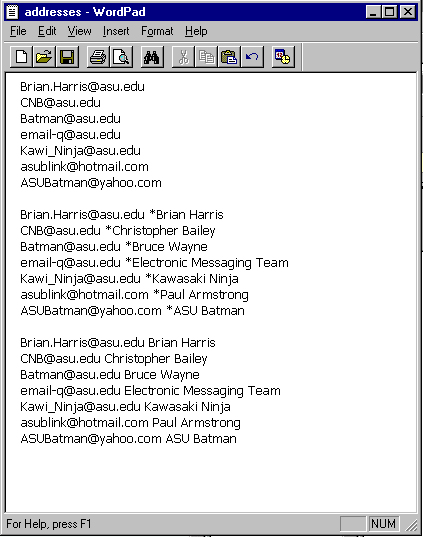
Note: Your list can contain any or all forms listed above
Upload the Address File
You can enter the complete name of the file or use the "Browse" function which will allow you to find the file on your local file system. The file will actually be transferred when you submit the form.
EX: C:\WINNT\Profiles\bhngr\Desktop\addresses.txt
Enter the Group Recipient Name (optional)
If you leave this blank it will appear to each recipient that it was sent only to them (the format depends on how it looks in the address file you supply). If you enter text in this field, all recipients will see that it was addressed to the text you specify. This is typically used to specify the name of a group. E.g. "All Psychology Majors".
Enter your e-mail address
This is the address that the recipients will see as the sender of the message. Replies will be addressed to this address. Note that ASU acceptable use policy stipulates that this must be a valid address that you have permission to use.
Enter the message subject
This entry will appear in the subject line of the e-mail message.
Enter the body of the message
You can either type the message directly into the form or compose the message in a text editor and paste it into the form.
Click "Send"
If the form was filled out correctly, you will now see a report of how many of the address were sent the message and how many entries in the file were invalid. If the form was filled out incorrectly, you will be informed of what fields were incorrect.
Back to the form.